VividLens Camera: Capture and Edit Photos on Android
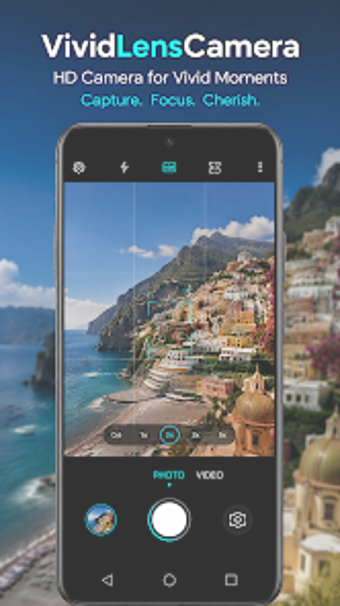
VividLens Camera, from CALLERSHOW, is a mobile photography and editing app that enhances on-device photo capture and post-processing. It pairs a camera with real-time filter previews and an integrated editor to capture, adjust exposure, and export high-resolution images. Key tools include an advanced beauty mode, brightness and contrast controls, a collage maker, and sticker overlays. The app targets social media creators and casual photographers seeking a fast capture-to-edit single-app workflow. It also supports importing existing photos from the device gallery for post-capture edits.
What does VividLens Camera do?
The app functions as both a camera and an editor, letting users apply effects while framing and finish edits afterward. Core capture and editing capabilities include:
Real-time artistic filters visible in the preview before the shot
An advanced beauty mode with skin smoothing and facial feature enhancement
Adjustments for brightness, contrast, saturation, and sharpness, plus a collage maker
These tools keep the whole workflow on the device from capture to export.
Does VividLens affect device performance during capture?
Real-time previews and beauty effects require on-device processing, and the developer describes the app as having lightweight performance across a range of Android hardware specifications. That suggests reduced lag on contemporary phones, though specific CPU or memory figures are not provided. Users on older devices should expect variability, since version requirements and device compatibility can change by model.
Is it safe to grant camera and storage permissions?
The app requests standard camera and device storage permissions to capture and save photos, and it supports importing images from the gallery for editing. It also offers built-in sharing to social platforms, which transmits edited files off-device. There is no mention of mandatory cloud sync in the feature set, so image handling remains primarily local unless the user chooses social sharing.
Do I need technical knowledge to use VividLens Camera?
The interface simplifies complex edits into one-tap actions for common adjustments while exposing manual controls for precise tuning. Casual users can rely on the beauty mode and preset filters, while creators who want specific results can use the editor’s sliders for exposure and color corrections. Template-driven collage and stickers reduce setup time for social posts without requiring specialist skills.
Who benefits most and what to watch for
VividLens Camera is a practical option for Android users who need an integrated capture-to-edit workflow on a single device. A notable trade-off: the app may display advertisements and offer optional in-app purchases that interrupt the editing or sharing flow. It suits social creators and everyday photographers who prefer quick, on-device edits rather than external desktop workflows.
Pros
Real-time filter previews visible before taking a photo
Advanced beauty mode with skin smoothing and facial feature controls
Built-in editor for brightness, contrast, saturation, and sharpness
Lightweight performance aimed at a wide range of Android devices
Cons
May display advertisements and optional in-app purchases
Requires camera and storage permissions to capture and save images
Compatibility and performance vary by device and version
Laws concerning the use of this software vary from country to country. We do not encourage or condone the use of this program if it is in violation of these laws. Softonic may receive a referral fee if you click or buy any of the products featured here.